
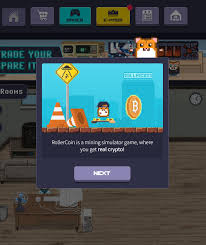
Sign-up at a glance
| Cost to register | Free — no deposit, no card |
|---|---|
| What you need | A valid email (or a supported social account) and a strong password |
| Time to start mining | About 2 minutes |
| Security options* | Two-factor authentication (2FA), email confirmation |
| Accounts allowed | One per person — multi-accounting is bannable |
*Available security features are quoted from the official rollercoin.com site and may change.
Registering for RollerCoin is genuinely easy — that's not the hard part. The hard part is doing it safely, because your account isn't just a game profile. It's a wallet that holds real, withdrawable crypto, and that makes it a target. Get the security basics right on day one and you'll never think about them again. Skip them, and a single phishing link can wipe weeks of grinding.
This guide walks through the whole journey: creating the account, confirming your email, turning on the protections that matter, recovering access if you're locked out, and — most importantly — spotting the fake login pages that are built specifically to steal your credentials.
How to create a RollerCoin account
Start from the right place. Type the official address yourself or use a saved bookmark — do not click a “register here” link from a random ad, YouTube comment, or Telegram DM.
- Go to the official RollerCoin website and choose Sign Up / Register.
- Enter a valid email address. Use one you control and check regularly — you'll need it for confirmation and recovery. A social login (where offered) is also fine.
- Set a strong, unique password. Not the one you use elsewhere. A password manager makes this painless and is strongly recommended for any account holding crypto.
- Confirm your email. Click the verification link RollerCoin sends. This activates the account and ties recovery to an inbox you own.
- You're in. Pick a nickname, and the game drops you straight into your first miner and a tutorial. You can start playing mini-games immediately.
Referral tip: if a friend plays, registering through their legitimate referral link sometimes grants a small starter bonus to you both. Just make sure the link lands on the real domain before you sign up.
Logging in (and staying logged in safely)
Day-to-day login is simple, but the habits around it are what keep you safe:
- Always start from your bookmark. Muscle-memory of typing the address or using a saved favourite defeats most phishing in one stroke.
- Check the address bar before typing your password. Look for the exact official domain and a valid padlock. Look-alike domains with extra words or odd spellings are the giveaway.
- Don't stay logged in on shared devices. On a public or family computer, log out and avoid “remember me.”
- Use the app on mobile. The official app removes the risk of mistyping into a fake site.
Securing your account: the 5-minute checklist
Do these once and your balance is dramatically safer than the average player's:
Turn on 2FA
Two-factor authentication is the single biggest upgrade. Even if someone steals your password, they can't log in without your second factor. Save your backup codes offline.
Unique password
Reused passwords are how breaches cascade. Generate a long, unique one in a password manager and never type it anywhere but the official site.
Secure your email
Your inbox is the master key — anyone who controls it can reset your game password. Protect the email account with its own 2FA.
Verify before you click
Hover links to preview the destination. Official communication never asks for your password or 2FA code. Ever.
Spotting phishing clones
Phishing pages copy the real login screen down to the last pixel, then harvest whatever you type. Because RollerCoin holds crypto, it attracts a lot of these. Here's how to stay ahead:
Red flag: any page or message that asks for your wallet seed phrase or private keys is a scam, full stop. RollerCoin never needs them. A real login asks only for your email/username and password — and your 2FA code on your own device.
✅ The real login
- Exact official domain in the address bar
- Reached from your own bookmark or the app
- Asks only for email/username + password
- 2FA prompt happens on your device
🚩 A phishing clone
- Look-alike domain or URL shortener
- Arrived via DM, ad, or “giveaway” link
- Asks for seed phrase, private key, or 2FA secret
- Urgency: “verify now or lose your coins!”
Account recovery & common login problems
Locked out? Work through these before panicking:
- Forgot password: use the official “Forgot password” link to get a reset email. If it doesn't arrive, check spam and confirm you're using the email you registered with.
- Lost 2FA device: this is what backup codes are for. Keep them somewhere safe and offline. Without them, recovery is much harder — which is the point.
- Email no longer accessible: regain control of the inbox first; it's the anchor for everything else.
- Still stuck: contact official RollerCoin support through the in-site help channel — never through a “support agent” who DMs you first. Real support never initiates contact asking for credentials.
Email vs. social login: which to choose
RollerCoin typically lets you register with either an email/password combo or a one-click social login. Both are fine — the right choice depends on your habits:
📧 Email + password
- Full control, no third party in the loop
- Works even if you quit a social platform
- Best paired with a password manager + 2FA
- Recovery tied only to your inbox
🔗 Social login
- Fast — no new password to remember
- Inherits that account's security (good or bad)
- Depends on the provider staying available
- Secure the linked account with its own 2FA
Whichever you pick, the security chain is only as strong as its weakest link. If you use social login, the account you log in with effectively guards your crypto — so lock that one down too.
What data RollerCoin needs (and what it never should)
A free mining game shouldn't demand your life story. Here's the reasonable baseline versus the alarm bells:
| Request | Normal? | Notes |
|---|---|---|
| Email address | Yes | For confirmation, login and recovery. |
| Password / 2FA setup | Yes | Standard account security. |
| Withdrawal wallet address | Yes, at payout | A public address only — never a private key. |
| Wallet seed phrase / private key | Never | No legitimate site asks for this. Hard stop. |
| Another site's password | Never | Classic phishing. Walk away. |
The referral system, explained honestly
RollerCoin has a referral program, and you'll see creators pushing their links hard. Here's the straight version: a genuine referral link, used to register, can grant a small starter perk to you and a bonus to the referrer — usually a slice of the power the referred player earns, not money taken from your balance. That's legitimate.
What's not legitimate is being pressured to register through a link on a sketchy domain, or a “referral” that redirects you somewhere asking for a deposit or login. Always confirm the link lands on the real RollerCoin domain before you sign up. If you do play, your own referral link becomes a modest passive-power source — a fair F2P bonus, but not a get-rich scheme.
Tip: bookmark your account's referral page once you're in, and share your link only where it's allowed. Spamming it gets you nowhere and can violate community rules.
Step-by-step: turning on two-factor authentication
2FA is the highest-leverage five minutes you'll ever spend on your account. The exact menu wording changes over time, but the flow is universal:
- Install an authenticator app (such as a TOTP app) on your phone before you start. Avoid SMS-only 2FA where an app option exists — SIM-swapping is a real attack.
- Open your RollerCoin account security settings and choose to enable two-factor authentication.
- Scan the QR code with your authenticator app, then enter the 6-digit code it generates to confirm the link.
- Save your backup codes somewhere offline — a password manager or paper. These are your lifeline if you lose your phone.
- Test it: log out and back in to confirm the prompt works. Done — your account now needs something you have, not just something you know.
A phishing attempt, dissected
Here's a realistic scenario so you'll recognise it in the wild. You post in a community asking why a withdrawal is slow. Minutes later, a friendly “support agent” DMs you a link to “verify your account and release the funds.” The page looks identical to the real login. You enter your details — and they're instantly captured. If you'd had no 2FA, your balance is gone in seconds.
Every step of that attack is defeated by the habits above: real support never DMs first, you'd reach the site only from your bookmark, the look-alike domain would betray itself in the address bar, and even a stolen password is useless against 2FA. Internalise the pattern — unsolicited contact + urgency + a link asking for credentials — and you'll spot it every time.
Your account-safety habit checklist
- ✔ Unique password, stored in a manager, used nowhere else
- ✔ Two-factor authentication on, backup codes saved offline
- ✔ Your email account secured with its own 2FA
- ✔ Login only ever from your own bookmark or the official app
- ✔ Zero tolerance for anyone asking for your password, 2FA code, or seed phrase
- ✔ Logged out on shared or public devices
Login & registration FAQ
How do I create a RollerCoin account?
Open the official website or app, choose Sign Up, enter a valid email and a strong unique password (or use a social login), confirm your email, and you can start mining immediately.
How do I log in securely?
Always reach the login page from your own bookmark, enable two-factor authentication, and never enter your credentials on a page linked from a DM, ad, or unexpected email.
I forgot my password — what now?
Use the 'Forgot password' link on the official login page to receive a reset email. If you enabled 2FA, keep your backup codes safe, as they're needed to regain access.
Can I have more than one account?
No. RollerCoin allows one account per person. Running multiple accounts is against the terms and risks a permanent ban with forfeited balances.
Will RollerCoin ever ask for my wallet seed phrase?
Never. No legitimate login, promo, or support request needs your seed phrase or private keys. Any page that asks is a scam — close it.
Next step: see the app & download guide to mine on mobile, or estimate your rewards with the earnings calculator.